2011年12月14日 星期三

Ubuntu PPPoE server

安裝 Server軟體


1) 抓rp-pppoe
wget -c http://easylinux.info/uploads/rp-pppoe-3.6.tar.gz
sudo tar zxvf rp-pppoe-3.6.tar.gz -C /opt/
sudo chown -R root:root /opt/rp-pppoe-3.6/

2) 安裝軟體 develop library:
sudo apt-get install libc6-dev

3) 產生需要的pppoe server程式
sudo /opt/rp-pppoe-3.6/go


設定組態


1)修改/etc/ppp/options,讓它的內容如下(下面的所有檔都一樣,如果你的系統中找不到,則create一個):
lock
crtscts
nobsdcomp
nodeflate
nopcomp
2)修改/etc/ppp/pppoe-server-options檔,內容如下:
auth
#
使用chap認證方式,如果想用pap認證方法則用require-pap
require-chap
default-mru
default-asyncmap
lcp-echo-interval 60
lcp-echo-failure 5
#
這兩條ms-dns參數是設置給PPPOE用戶端分配的DNS伺服器位址
ms-dns 1.1.1.1
ms-dns 2.2.2.2
noipdefault
noipx
nodefaultroute
#
如果您想讓PPPOE用戶端機器可以通過PPPOE伺服器上網,則得通過這個參數開開啟PPPOE伺服器的arp proxy功能
proxyarp
noktune
netmask 255.255.255.255
logfile /var/log/pppd.log

3)添加用戶端的用戶名和密碼檔,如果使用chap認證方式請更改/etc/ppp/chap-secrets檔,如果使用pap認證方式請更改/etc/ppp/chap-secrets檔,採用下面的格式:
“test" * "123456" *
每一行由四個欄位構成,第一個欄位為帳戶名稱,例子中設置為test,第二個欄位為伺服器,保持為*不做限制就是,第三個欄位為使用者密碼,例子中設置為123456,第四個欄位為允許從那個IP來撥號,設置為*不作限制就可以了。
4)啟動PPPOE伺服器。
/usr/local/ppp/sbin/pppoe-server -k -I eth0 -L 192.168.1.1 -R 192.168.1.10-200
上面命令在啟動PPPOE伺服器時指定了本地介面的IP為192.168.1.1,給用戶端分配的IP地址範圍是192.168.1.10-192.168.1.200。

2011年12月8日 星期四

IPSec NAT-T技術


在 NAT 技術和 IPsec 技術的應用都非常廣泛。但從本質上來說,兩者是存在著矛盾的。

1. 從 IPsec 的角度上說, IPsec 要保證資料的安全,因此它會加密和校驗資料。
2. 
從 NAT 的觀點來看,為了完成地址轉換,勢必會修改 IP 地址。

         IPSec 提供了點對點的 IP 通信的安全性,但在 NAT 環境下對 IPSec 的支持有限, AH  Protocol是肯定不能進行 NAT 的了,這和 AH 設計的理念是相違背的; ESP  Protocol在 NAT 環境下最多只能有一個 VPN 主機能建立 VPN 通道,無法實現多台機器同時在 NAT 環境下進行ESP 通信。關於 IPSec 在 NAT 環境下的需求問題在 RFC3715 中進行了描述。
       NAT 
穿越 (NAT Traversal , NAT-T) 就是為解決這個問題而提出的, RFC3947 , 3948 中定義,在 RFC4306 中也加入了 NAT-T 的說明,但並沒廢除 RFC3947 , 3948 ,只是不區分階段 1 和階段 2 。該方法將 ESP  Protocol封包封裝到 UDP 封包中(在原 ESP  Protocol的 IP 封包頭外添加新的 IP Header和 UDP Header),使之可以在 NAT 環境下使用的一種方法,這樣在 NAT 的內部網中可以有多個 IPSec 主機建立 VPN 通道進行通信。
   AH 
封裝: AH 封裝的校驗從 IP Header開始,如果 NAT 將 IP 的 Header改動, AH 的校驗就會失敗,因此我們得出結論,AH 是無法與 NAT 共存的。ESP 封裝的傳輸模式:對於 NAT 來說, ESP 封裝比 AH 的優勢在於,無論是加密還是完整性的校驗, IP Header部都沒有被封包括進去。但是還是有新的問題,對於 ESP 的傳輸模式, NAT  無法更新上層Check Sum。TCP  和  UDP   Header封包含一個Check Sum,它整合了源和目標 IP  地址和Port Number的值。

    當  NAT  改變了某個封包的  IP  地址和(或)Port Number時,它通常要更新  TCP  或  UDP  Check Sum。當  TCP  或  UDP  Check Sum使用了  ESP 來加密時,它就無法更新這個Check Sum。由於地址或端口已經被  NAT  更改,目的地的Check Sum檢驗就會失敗。雖然  UDP  Check Sum是Option的,但是  TCP  Check Sum卻是必需的。
       ESP 
封裝的 Tunnel模式:從 ESP  Tunnel模式的封裝中,我們可以發現, ESP  Tunnel模式將整個原始的 IP 封包整個進行了加 ​​密,且在 ESP的 Header外面新加了一層 IP Header,所以 NAT 如果只改變最前面的 IP 地址對後面受到保護的部分是不會有影響的。因此, IPsec 只有採用ESP 的 Tunnel模式來封裝資料時才能與 NAT 共存。

由於完整性Check牽涉到 IP Header部,所以 NAT 無法對其修改,不相容。
ESP 的傳輸模式,因為 TCP 部分被加密, NAT 無法對 TCP Check Sum進行修改,不相容。
ESP 
的 Tunnel模式,由於 NAT 改動外部的 IP 而不能改動被加密的原始 IP ,使得只有這種情況下才能與 NAT 共存。


NAT 穿越 (NAT Traversal , NAT-T)
       以前 NAT 和 IPsec 只能以 1 對 1 的形式共存, NAT-T 打破了這種形式。而且NAT-T 支持 ESP 的傳輸模式。NAT-T 的基本思想:
    將 ESP  Protocol封包封裝到 UDP 封包中(在原 ESP  Protocol的 IP 封包頭外添加新的 IP Header和 UDP Header)。使得 NAT 對待它就像對待一個普通的UDP 封包一樣。而且支持 ESP 的傳輸模式。NAT-T 的基本原理和執行步驟
1. 檢測通信中是否存在 NAT 設備和對方是否支持 NAT-T NC 
2.檢測對方是否支持 NAT-T 是通過交換 vendor ID 載荷來實現的,如果自身支持 NAT-T ,在 IKE 開始交互就要發送這種載荷,載荷內容是“ RFC 3947 ”的 MD5 值,也就是十六進制的“ 4a131c81070358455c5728f20e95452f ”

2011年12月3日 星期六

IPsec PPTP L2TP 的差異

穿隧技術 (Tuneling):穿隧技術是為了將私有數據網路的資料在公眾數據網路上傳輸,所發展出來的一種資料包裝方式(Encapsulation),亦即在公眾網路上建立一條秘密通道。現在穿隧技術所使用的協定主要有:IPsec、PPTP 及 L2TP 等三種。
  • IPsec (IP Secruity):為第三層的穿隧技術,專門為 IP 所設計不但符合現有 IPv4 的環境,同時也是 IPv6 的標準,它也是 IEIF 所制定的業界標準,目前 IETF 從 1995 年起,陸續公佈許多網路安全之相關技術標準。這些標準統稱為 IPSec (IP Security),可參考 [RFC 1825]、[RFC 1826]、[RFC 1827]、[RFC 1828]、[RFC 1829]、[RFC 1851]、[RFC 2085]、[RFC 2104]
  • PPTP(Point to Point Tunneling Protocol):定義了一個主從式的架構,主要是由 PNS (PPTP Network Server) 和 PAC (PPTP Access Concentrator) 組成的機制,乃是透過這個機制來支援 VPN 的功能。將 IP、IPX 或 NetBEUI 通訊協定封裝在 IP 封包中,並使用 TCP 方式來交換加密通道的維護訊息。
  • L2TP (Layer 2 Tunneling Protocol):結合 Layer-2 Forwarding (L2F) 和 PPTP 的協定由 IETF 所提出的一個資料連結層的加密通訊協定。
PPTP 與 L2TP 均為第二層的穿隧技術,適合具有 IP/IPX/AppleTalk 等多種協定的環境。IPsec、PPTP、L2TP 三者,最大的不同在於運用 IPsec 的技術,使用者可以同時使用 Internet 與 VPN 的多點傳輸功能 (包括 Internet/Intranet/Extranet/Remote Access...等),而 PPTP 及 L2TP 只能執行點對點 VPN 的功能,無法同時執行 Internet 的應用,使用時較不方便而在安全性方面,IPSec 會對整個傳輸資料做加密而 PPTP 及 L2TP 則是僅針對封包的再包 (Encapsulation) 並未對資料做加密處理,安全性相對較低。

以下引用微軟的文章
通道可將一種通訊協定類型中的封包封裝在另一個通訊協定的資料包中。例如,VPN 使用 PPTP 透過公用網路 (例如,網際網路) 來封裝 IP 封包。可以設定以「點對點通道通訊協定」(PPTP)、「第二層通道通訊協定」(L2TP) 或「安全通訊端通道通訊協定」(SSTP) 為基礎的 VPN 解決方案。
PPTP、L2TP 和 SSTP 高度倚賴一開始指定給「點對點通道通訊協定」(PPTP) 的功能。PPP 是專為透過撥號或專用點對點連線傳送資料所設計。對於 IP,PPP 將 IP 封包封裝於 PPP 框架內,然後透過點對點連結傳輸封裝的 PPP 封包。PPP 一開始定義為在撥號用戶端和網路存取伺服器之間使用的通訊協定。

PPTP

PPTP 允許加密多重通訊協定流量,然後封裝在 IP 標頭裡,以透過 IP 網路或公用 IP 網路 (例如,網際網路) 傳送。PPTP 可用於遠端存取和站對站 VPN 連線。在使用網際網路作為 VPN 的公用網路時,PPTP 伺服器是啟用 PPTP 的 VPN 伺服器,一個介面在網際網路上,而第二個介面在內部網路上。

封裝

PPTP 將 PPP 框架封裝在 IP 資料包中以便透過網路傳輸。PPTP 使用 TCP 連線進行通道管理,並使用 Generic Routing Encapsulation (GRE) 的修改版來封裝通道資料之 PPP 框架。封裝之 PPP 框架的承載可以加密、壓縮,或兩者皆使用。下圖顯示包含 IP 資料包的 PPTP 封包之結構。
包含 IP 資料包的 PPTP 封包之結構
包含 IP 資料包的 PPTP 封包結構

加密

PPP 框架使用 MS-CHAP v2 或 EAP-TLS 驗證程序產生的加密金鑰,來以 Microsoft 點對點加密 (MPPE) 進行加密。虛擬私人網路用戶端必須用 MS-CHAP v2 或 EAP-TLS 驗證通訊協定,才能夠加密 PPP 框架的承載。PPTP 利用基本 PPP 加密,並封裝先前加密的 PPP 框架。

L2TP

L2TP 允許加密多重通訊協定流量,然後透過任何支援點對點資料包傳送的媒體 (例如:IP 或非同步傳輸模式 (ATM)) 來傳送。L2TP 是 PPTP 和「第二層轉送」(L2F) 的組合,這是 Cisco Systems, Inc. 所開發的技術。L2TP 可呈現 PPTP 和 L2F 的最佳功能。
和 PPTP 不同,Microsoft 所執行的 L2TP 不使用 MPPE 來加密 PPP 資料包。L2TP 仰賴「傳輸模式」中的「網際網路通訊協定安全性」(IPsec) 來進行加密服務。L2TP 和 IPsec 的組合即所謂 L2TP/IPsec。
VPN 用戶端和 VPN 伺服器都必須支援 L2TP 和 IPsec。L2TP 的用戶端支援內建於 Windows Vista® 和 Windows XP 遠端存取用戶端,而 L2TP 的 VPN 伺服器支援內建於 Windows Server® 2008 和 Windows Server 2003 家族的成員中。
L2TP 是使用 TCP/IP 通訊協定來安裝。

封裝

L2TP/IPsec 封包的封裝包含兩個層級:
第一層:L2TP 封裝
將 PPP 框架 (IP 資料包) 包裝於 L2TP 標頭和 UDP 標頭。
包含 IP 資料包的 L2TP 封包之結構
包含 IP 資料包的 L2TP 封包結構
第二層:IPsec 封裝
然後將結果 L2TP 訊息包裝在 IPsec「封裝安全承載」(ESP) 標頭和尾端、提供訊息完整性及驗證的 IPsec 驗證尾端,然後是最終 IP 標頭。在 IP 標頭中的是對應到 VPN 用戶端和 VPN 伺服器的來源及目的地 IP 位址。
以 IPsec ESP 加密 L2TP 流量
使用 IPsec ESP 加密 L2TP 流量

加密

L2TP 訊息可使用「網際網路金鑰交換」(IKE) 交涉處理產生的加密金鑰,以「資料加密標準」(DES) 或「三重資料加密標準」(3DES) 進行加密。

SSTP

「安全通訊端通道通訊協定」(SSTP) 是新的通道通訊協定,透過 TCP 通訊埠 443 使用 HTTPS 通訊協定,將流量傳遞通過可能會封鎖 PPTP 和 L2TP/IPsec 流量的防火牆和網路 Proxy。SSTP 提供透過 HTTPS 通訊協定的「安全通訊端層」(SSL) 通道來封裝 PPP 流量的機制。使用 PPP 可支援強式驗證方法,如 EAP-TLS。SSL 利用增強金鑰交涉、加密和完整性檢查來提供傳輸層安全性。
當用戶端嘗試建立以 SSTP 為基礎的 VPN 連線時,SSTP 首先會建立 SSTP 伺服器的雙向 HTTPS 層。透過此 HTTPS 層,通訊協定封包可如資料承載一般傳送。

封裝

SSTP 將 PPP 框架封裝在 IP 資料包中以便透過網路傳輸。SSTP 使用 TCP 連線 (透過通訊埠 443) 來進行通道管理,和 PPP 資料框架一樣。

加密

SSTP 訊息是以 HTTPS 通訊協定的 SSL 通道進行加密。

選擇通道通訊協定

當您要在 PPTP、L2TP/IPsec 和 SSTP 遠端存取 VPN 解決方案中做選擇時,請考量下列事項:
  • 許多 Microsoft 用戶端都能使用 PPTP,包括 Microsoft Windows 2000、Windows XP、Windows Vista 以及 Windows Server 2008。和 L2TP/IPsec 不同,PPTP 不需要使用公開金鑰基礎結構 (PKI)。透過使用加密,以 PPTP 為基礎的 VPN 連線可機密地提供資料 (沒有加密金鑰就無法解譯擷取的封包)。但是,以 PPTP 為基礎的 VPN 連線不提供資料完整性 (證明資料在傳輸途中沒有修改) 或資料來源驗證 (證明資料是由授權的使用者所傳送)。
  • L2TP 只能夠在執行 Windows 2000、Windows XP 或 Windows Vista 的用戶端電腦使用。L2TP 支援電腦憑證或預先共用金鑰作為 IPsec 的驗證方法。電腦憑證驗證 (建議的驗證方法) 必須要有 PKI 來簽發電腦憑證給 VPN 伺服器電腦和所有 VPN 用戶端電腦。透過使用 IPsec,L2TP/IPsec VPN 連線可提供資料機密性、資料完整性和資料驗證。

    和 PPTP 及 SSTP 不同,L2TP/IPsec 在 IPsec 層啟用機器驗證,而在 PPP 層啟用使用者層級驗證。
  • SSTP 只能夠在執行 Windows Vista Service Pack 1 (SP1) 或 Windows Server 2008 的用戶端電腦使用。透過使用 SSL,SSTP VPN 連線可提供資料機密性、資料完整性和資料驗證。
  • 三種通道類型均將 PPP 框架攜帶於網路通訊協定堆疊的最上層。因此,PPP 的一般功能 (例如,驗證機制、第四版網際網路協定 (IPv4)、第六版網際網路協定 (IPV6) 交涉,以及網路存取保護 (NAP)) 仍然和三種通道類型一樣。

其他參考資料

PPPoE Operation

Stages

PPPoE has two stages:
  • Discovery stage - a client discovers all available access concentrators and selects one of them to establish PPPoE session.This stage has four steps: initialization, offer, request and session confirmation . PPPoE Discovery uses special Ethernet frames with their own Ethernet frame type 0x8863.
Pppoe-discovery.png
To initiate discovery, PPPoE client sends PADI frame to the broadcast Ethernet address (FF:FF:FF:FF:FF:FF) and may specify particular service name.
When server receives PADI frame, it responds with PADO frame to Client's unicast Ethernet address. There can be more than one server in broadcast range of the client. In such case client collects PADO frames and picks one (in most cases it picks the server which responded first) to start session.
Client sends PADR frame to unicast Ethernet address of the server it chose. If server agrees to set up a session with this particular client, it allocates resources to set up PPP session and assigns Session ID number. This number is sent back to client in PADS frame. When client receives PADS frame, it knows servers mac address and Session ID, it allocates resources and session can begin.
  • Session - When discovery stage is completed, both peers know PPPoE Session ID and other peer's Etehrnet (MAC) address which together defines PPPoE session. PPP frames are encapsulated in PPPoE session frames, which have Ethernet frame type 0x8864.
    When server sends confirmation and client receives it, PPP Session stage is started that consists of following steps:
    • LCP negotiation
    • Authentication
    • IPCP negotiation - client is assigned with an IP address.

PPPoE server sends Echo-Request packets to the client to determine the state of the session, otherwise server will not be able to determine that session is terminated in cases when client terminates session without sending Terminate-Request packet.
More detailed description of PPPoE protocol can be found in RFC 2516

Used Packet Types

PacketDescription
PADIPPPoE Active Discovery Initialization
The PPPoE client sends out a PADI packet to the broadcast address. This packet can also populate the "service-name" field if a service name has been entered on the dial-up networking properties of the PPPoE broadband connectoid. If a service name has not been entered, this field is not populated
PADOPPPoE Active Discovery Offer
The PPPoE server, or Access Concentrator, should respond to the PADI with a PADO if the Access Concentrator is able to service the "service-name" field that had been listed in the PADI packet. If no "service-name" field had been listed, the Access Concentrator will respond with a PADO packet that has the "service-name" field populated with the service names that the Access Concentrator can service. The PADO packet is sent to the unicast address of the PPPoE client
PADRPPPoE Active Discovery Request
When a PADO packet is received, the PPPoE client responds with a PADR packet. This packet is sent to the unicast address of the Access Concentrator. The client may receive multiple PADO packets, but the client responds to the first valid PADO that the client received. If the initial PADI packet had a blank "service-name" field filed, the client populates the "service-name" field of the PADR packet with the first service name that had been returned in the PADO packet.
PADSPPPoE Active Discovery Session confirmation
When the PADR is received, the Access Concentrator generates a unique session identification (ID) for the Point-to-Point Protocol (PPP) session and returns this ID to the PPPoE client in the PADS packet. This packet is sent to the unicast address of the client.
PADTPPPoE Active Discovery Terminate
might be sent anytime after a session is established to indicate that a PPPoE session terminated. It can be sent by either server or client.


MTU

Typically largest Ethernet frame that can be transmitted without fragmentation is 1500 bytes. PPPoE adds another 6 bytes of overhead and PPP field adds two more bytes, leaving 1492 bytes for IP datagram. Therefore max PPPoE MRU and MTU values must not be larger than 1492.
TCP stacks try to avoid fragmentation, os they use an MSS (Maximum Segment Size). By default MSS is chosen as MTU of the outgoing interface minus the usual size of the TCP and IP headers (40 bytes), which results in 1460 bytes for an Eternet interface. Unfortunately there may be intermediate links with lower MTU which will cause fragmentation. In such case TCP stack performs path MTU discovery. Routers which cannot forward the datagram without fragmentation are supposed to drop packet and send ICMP-Fragmentation-Required to originating host. When host receives such ICMP, it tries lower MTU. This should work in ideal world, however in real world many routers do not generate fragmentation-required datagrams, also many firewalls drop all ICMP datagrams.
Workaround for this problem is to adjust MSS if it is too big. By default RouterOS adds mangle rules to intercept TCP SYN packets and silently adjust any advertised MSS option so they will be appropriate for the PPPoE link.
Additional information on maximum supported MTUs for routerboards are listed here.

2011年11月14日 星期一

Android刪除首次登入的Google帳號


目前Android系統的手機非常的火紅,使用Android系統也一陣子了,記得第一次幫同事安裝新手機時,以自己的Gmail來設定並安裝market上應用程式,發現第一個登入Gmail的帳號無法刪除,真是糗大了,結果使用最原始的方法將手機回到出廠設定,但應用程式也都必須捲土重來,真是做了一次白工,於是從Google上找了許多方法,發現可利用Titanium Backup工具來刪除Google帳號,換句話說此方法的最基本條件必須要有 Root。

方法一 :


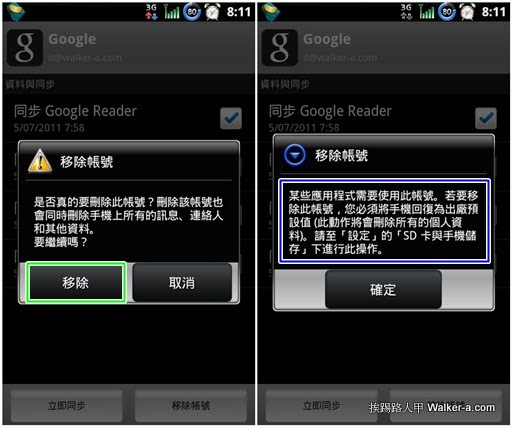
▼Gmail內的移除帳號是針對非第一個登入帳號才能刪除,若強制移除會出現如右圖藍色框內的訊息,此訊息竟告訴使用者到「設定」\「SD卡與手機儲存」\「恢復原廠設定」,天啊!那裡面安裝的軟體豈不是要重來嗎?簡直是晴天霹靂~~~~~,若你的手機有Root,可透過Titanium Backup來備份應用程式後,待回到原廠設定後,此時可以登入想更換的Gmail帳號,接下來再還原之的備份的應用程式。

tb15.jpg


方法二 :


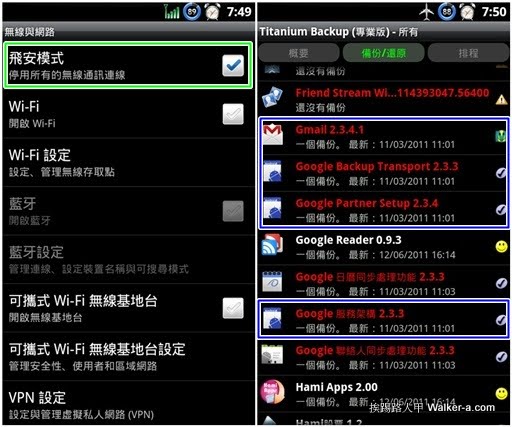
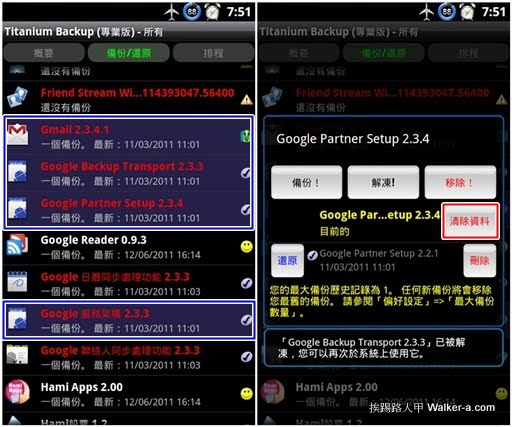
▼首先將手機設定成「飛安模式」,利用Titanium Backup(鈦備份)來凍結Gmail相關程式,有Gmail、Google Backup Transport、Google Partner Setup與Google 服務架構等(藍色框內的程式)。

tb16.jpg

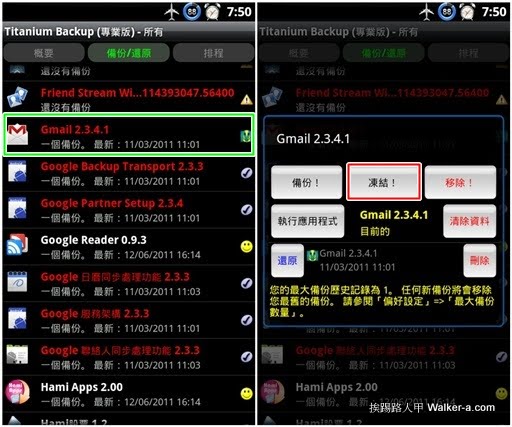
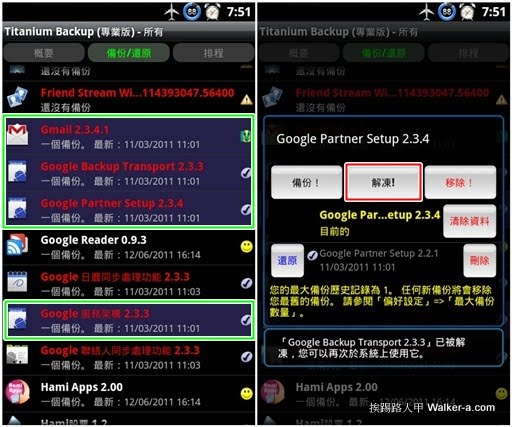
▼點選在想要凍結的程式(綠色框),右圖出現的畫面上點選紅色框內的「凍結」即可,將Gmail、Google Backup Transport、Google Partner Setup與Google 服務架構都凍結。

tb19.jpg

▼被凍結的程式會出現藍紫的背景色,接著再點選每個凍結的程式,結果畫面出現可解凍的圖示,代表此程式目前是被凍結中,按下紅色框內的「清除資料」,一樣必須將Gmail、Google Backup Transport、Google Partner Setup與Google 服務架構等程式內的歷史資料都清除,。

tb17.jpg

▼清除歷史資料都後,記得得幫剛凍結的程式解凍,不然是無法使用的,一一的點選綠色框內的程式,並在右圖中按下紅色框內的「解凍」即可,全部解凍後重新開機。

tb20.jpg

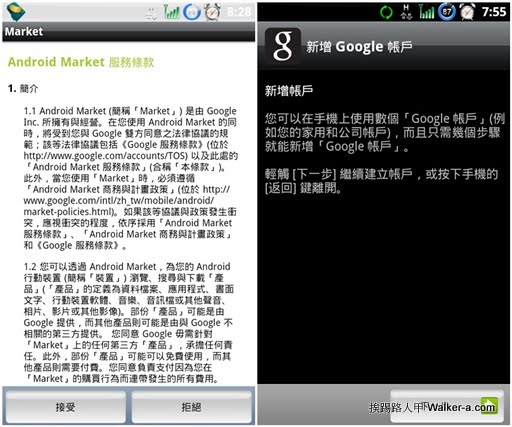
▼重新開機後將「飛航模式」取消,並進入Market或Gmail來重新設定第一個Gmail帳號,果然出現新增帳號的畫面。

tb18.jpg

在 iOS device 同步 google 連絡人


設定 ->電子郵件/通訊錄/行事曆->新增帳號


選 Microsoft Exchange

  電子郵件:填你的Gamil

  域名:空白

  用戶名:填你Gmail address


  密碼:Gmail密碼


  伺服器: m.google.com

How to repair and clone disk with ddrescue

  ddrescue  is a tool that can be used to repair and clone disks on a  Linux system . This includes hard drives, partitions, DVD discs, flas...