2010年4月7日 星期三

146顆cpu的綜合評比

今年三月底法國網站BeHardware推出了真正的超級大亂鬥CPU評測,共使用了146顆分別來自Intel和AMD的雙核、三核、四核、六核處理器,測試了12個項目,得出成績共1752項
測試項目分別如下

3D Studio MAX 2010 MentalRay渲染引擎測試
Cinema 4D R11(Cinebench)
MinGW/GCC編譯Mame代碼測試
WinRAR 3.9壓縮測試
Avidemux x264視頻編碼測試
MainConcept H.264/AVC Pro編碼測試
After Effects CS4 3D動畫特效測試
Nuendo 4.3混音測試
《Crysis》1.2版800x600解析度最高畫質內置CPU測試
《閃擊點2》1.03版800x600解析度最高畫質
《GTA IV》1.0.4.0版800x600解析度最高畫質
《大航海世紀ANNO 1404》800x600解析度最高畫質
全平臺功耗:Prime95滿載和閒置
ATX12V功耗(分平臺)

平均測試成績,以Core 2 Quad Q6600每項測試成績為基準100分換算得來


reference form :http://www.mobile01.com/topicdetail.php?f=296&t=1498511

2010年4月5日 星期一

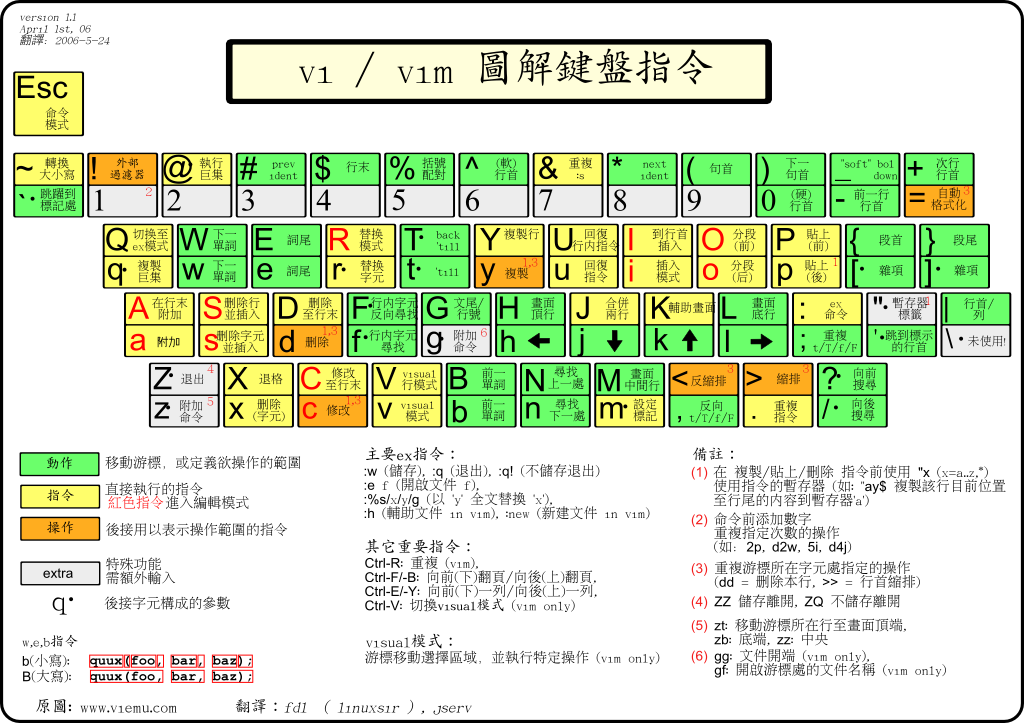
Vim 鍵盤指令圖解

常用的ubuntu 熱鍵

Ctrl + N New 開新檔案
Ctrl + O Open 開啟舊檔
Ctrl + A Select all 全選
Ctrl + X Cut 剪下
Ctrl + C Copy 複製
Ctrl + V Paste 貼上
Ctrl + Z Undo 重來、上一步
Ctrl + Y Redo 復原(與上一 步相反功能)
Ctrl + S Save 儲存
Ctrl + W Close 關閉檔案
Ctrl + Q Quit 離開程式
Alt + Tab
切換視窗
Alt + Shift+Tab
反向切換視窗
Alt + Space
視窗控制選單
(與在視窗標題列案滑鼠右鍵同功能)
Alt + Print Screen
擷取目前視窗畫面
Ctrl + Alt + d
全部視窗最小化
alt + 滑鼠左鍵
可以移動視窗
alt + 滑鼠中鍵
可以resize視窗
Ctrl + Alt + right arrow
切換桌面
Ctrl + Alt + left arrow
切換桌面
Ctrl + Alt + up arrow
切換桌面
Ctrl + Alt + down arrow
切換桌面
Ctrl + Alt + F1 = 跳到文字模式1(virtual terminals)
Ctrl + Alt + F2(F3)(F4)(F5)(F6) = 跳到文字模式2~6
Ctrl + Alt + F7 = 回到桌面
Ctrl + Alt + Backspace 跳出桌面,進入登入畫面

How to Reset Ubuntu/Gnome Settings to Defaults without Re-installing

Keep in mind that this will only reset your Gnome-specific settings. If you are having problems with your video card, display, x-server, etc., this WILL NOT fix your problems.

If you don’t have access to your graphical (GUI) desktop to delete these folders in Nautilus or you’re stuck at the login screen, drop to a terminal by hitting CTRL + ALT + F1, login to your account, and run this command:

rm -rf .gnome .gnome2 .gconf .gconfd .metacity

Get back to your GUI desktop by hitting CTRL + ALT + F7.

利用電話透過Asterisk 開家裡電鎖

利用電話撥到家中電話透過Asterisk,若CallerID 符合自己設定的Call Filter List時,則由Analog Port 3接電鎖中繼器送出"#"給中繼器後,將啟動電鎖開關,來開啟大門,經測試以此方式門口機不會咬線.


[call-filter-custom-0]
fullname = unlock
exten = s,1,Goto(CallFilter-${CDR(src)}|1)
exten = CallFilter-0912000000,1,Goto(voicemenu-custom-5|s|1)
exten = CallFilter-0912000001,1,Goto(voicemenu-custom-5|s|1)
exten = i,1,Goto(voicemenu-custom-6|s|1)

[voicemenu-custom-5]

comment = unlock
exten = s,1,dial(zap/3/ww#,60,G(hangdoorphone,hangupcall,1))

[hangdoorphone]
exten = hangupcall,1,wait(30)
exten = hangupcall,n,hangup

How to repair and clone disk with ddrescue

  ddrescue  is a tool that can be used to repair and clone disks on a  Linux system . This includes hard drives, partitions, DVD discs, flas...